
 AI ticketing & automation
24/7/365 support
SOC 2 & GDPR
Bring every IT request into one workspace, route it to the right person, and resolve it faster with AI built in.
Free 14-day trial 5-minute setup No credit card required

Text products are trusted by 35,000+ leading brands





Use HelpDesk as an IT help desk ticketing system that keeps every internal and external request in one queue instead of scattered inboxes and chats.
Route, prioritize, and assign tickets automatically so the right person picks up the right ticket sooner.
Track ticket volume, response and resolution times, team workload, and ticket management activity in clear reports.

Collect IT requests from multiple channels, including email, live chat, Messenger, and SMS, in one inbox for true multichannel support. Your team replies from a single queue, and every conversation becomes a trackable ticket.
Sign up free
Group agents into chatting and ticketing teams by skill, shift, or department, so work is shared evenly and the right people see the right tickets.
Assign and reassign tickets and service requests, with ownership, priorities, and full history visible on every ticket.


Capture asset IDs, severity, and request type with tags and custom fields, so every case is easy to find, filter, and report on.
Save canned responses for common IT issues, so every agent answers consistently and routine fixes go out in one click.


Trigger actions in your CRM, asset tools, and internal systems using predefined Workflow actions, webhooks, and the API.
Follow per-agent and per-team metrics on ticket volume, response times, and resolution times in clear reports.

Control who sees what with role-based access, and track a full audit log of who changed what and when.
 SOC 2
SOC 2
 GDPR
GDPR
 CCPA
CCPA
 PCI DSS
 DPF
DPF
 WCAG 2
 BBB
BBB
Put AI to work on the repetitive parts of IT support. The built-in AI handles routine questions, so your team spends its time on the cases that need a person.

Resolves up to 73% of routine questions in chat before they become a ticket, then hands off to a human with full context.

Draft accurate replies from past ticket conversations, then edit and send.

See subject, main issue, progress, and suggested next steps at a glance.

Adjust tone, expand, and fix grammar in one click.

Detect the requester's language to route and respond appropriately.

Categorize tickets automatically with AI-based tags, using auto tagging and automation rules to sort incoming requests.
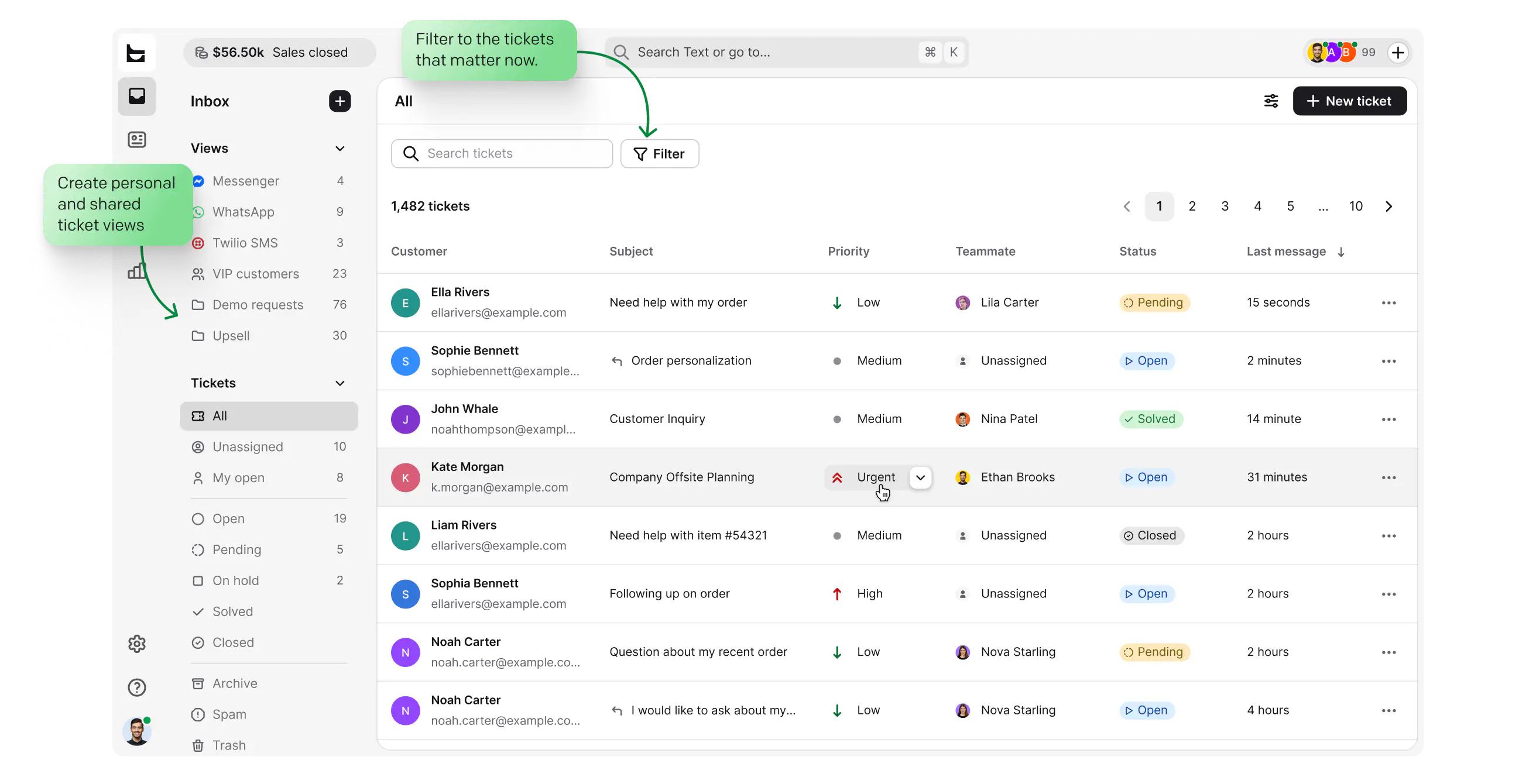
Every request lands in one inbox, from email, chat, Messenger, and SMS.
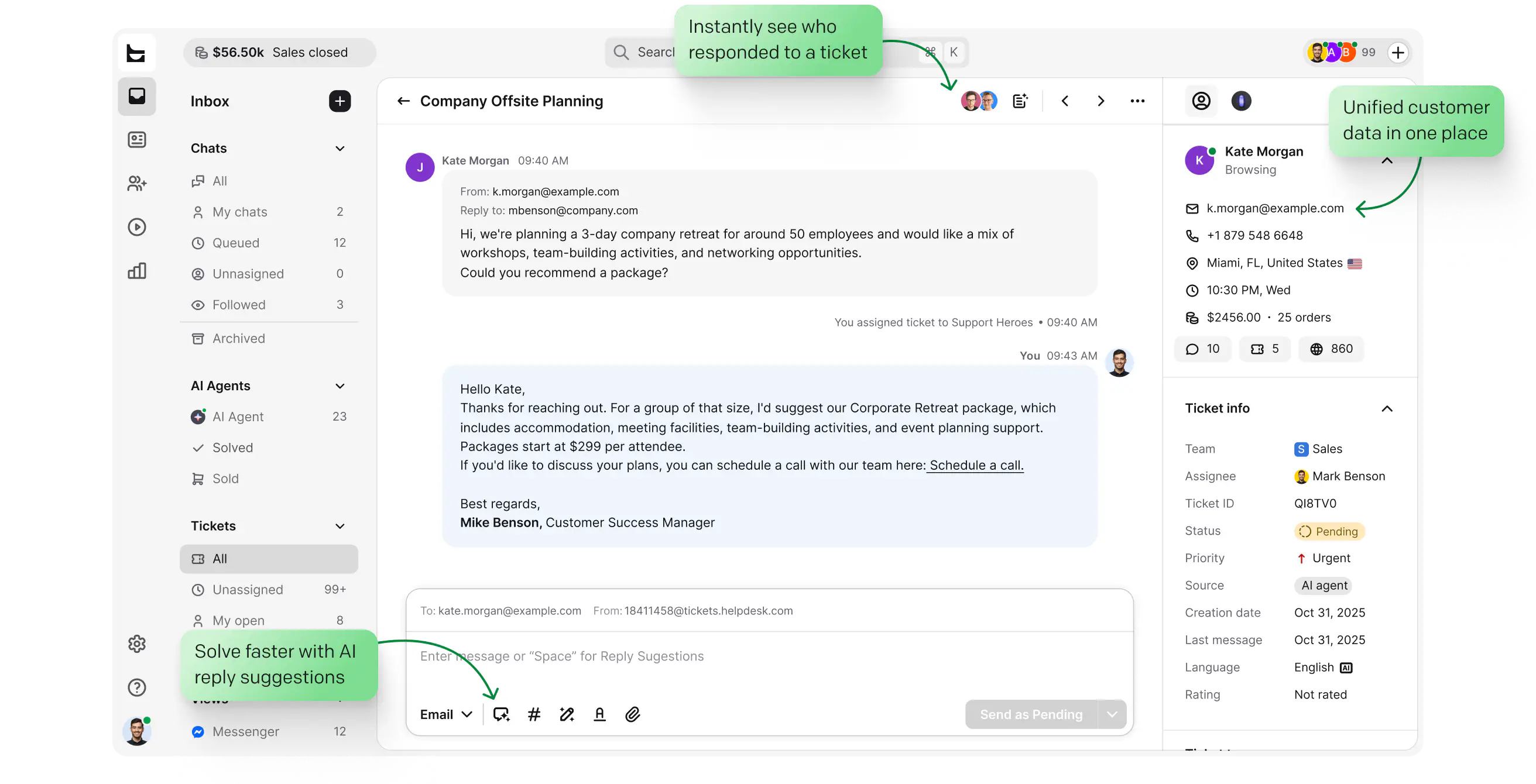
AI reply suggestions and unified requester data put the answer in front of the agent, helping the end user resolve issues faster.
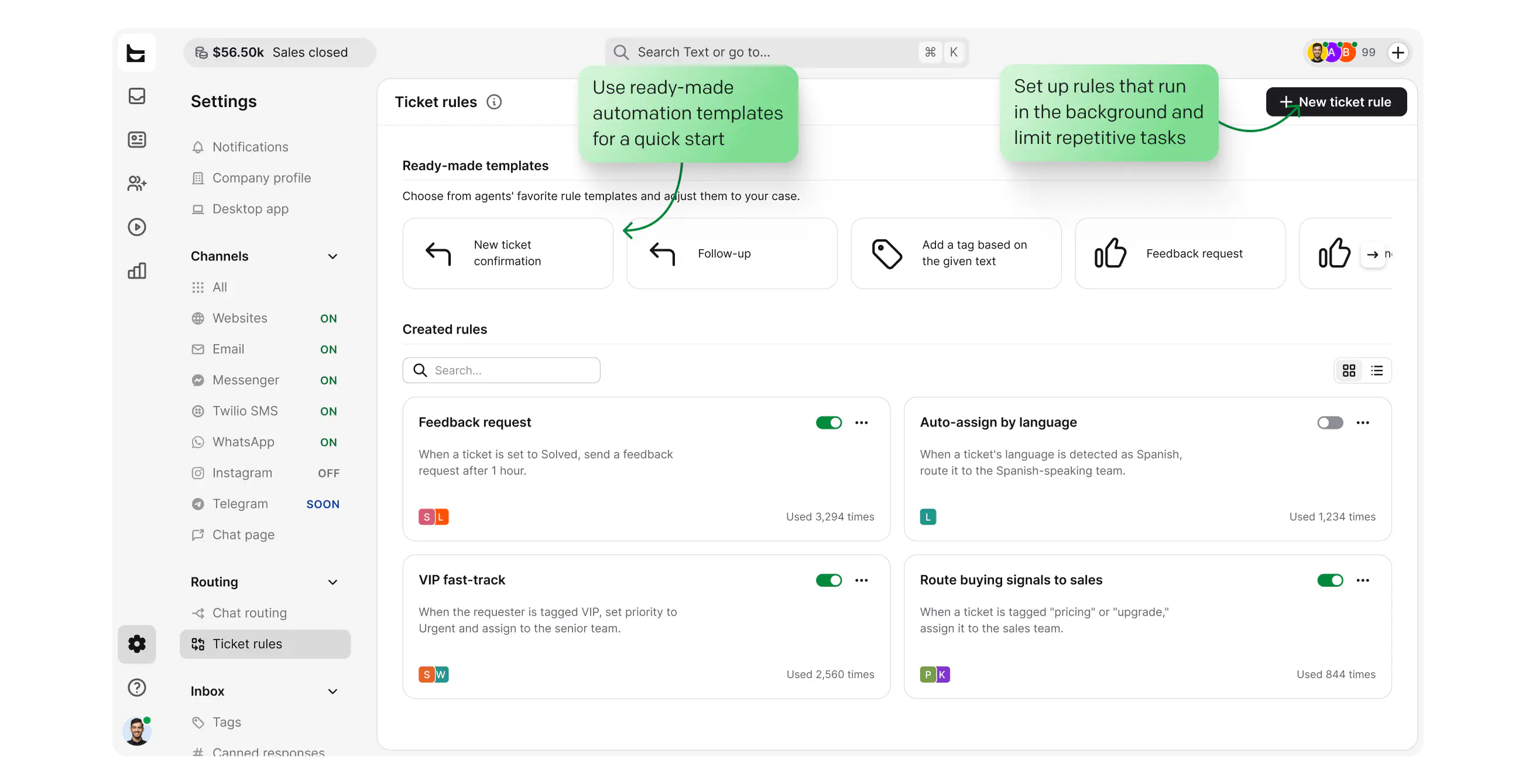
Rules send each ticket to the right team by skill, language, or load.
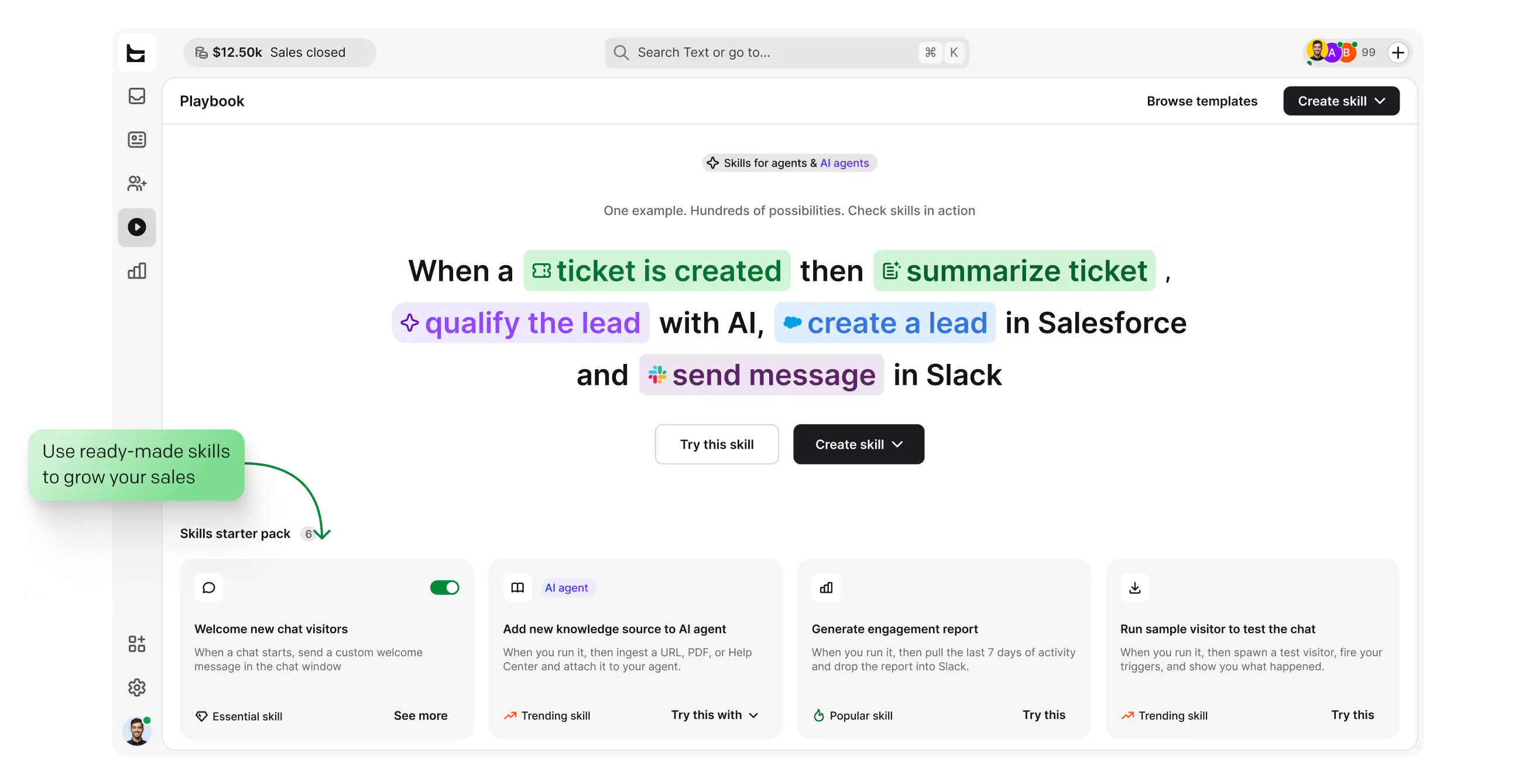
Workflows handle the repeatable steps, from tagging to follow-ups, reducing manual work.
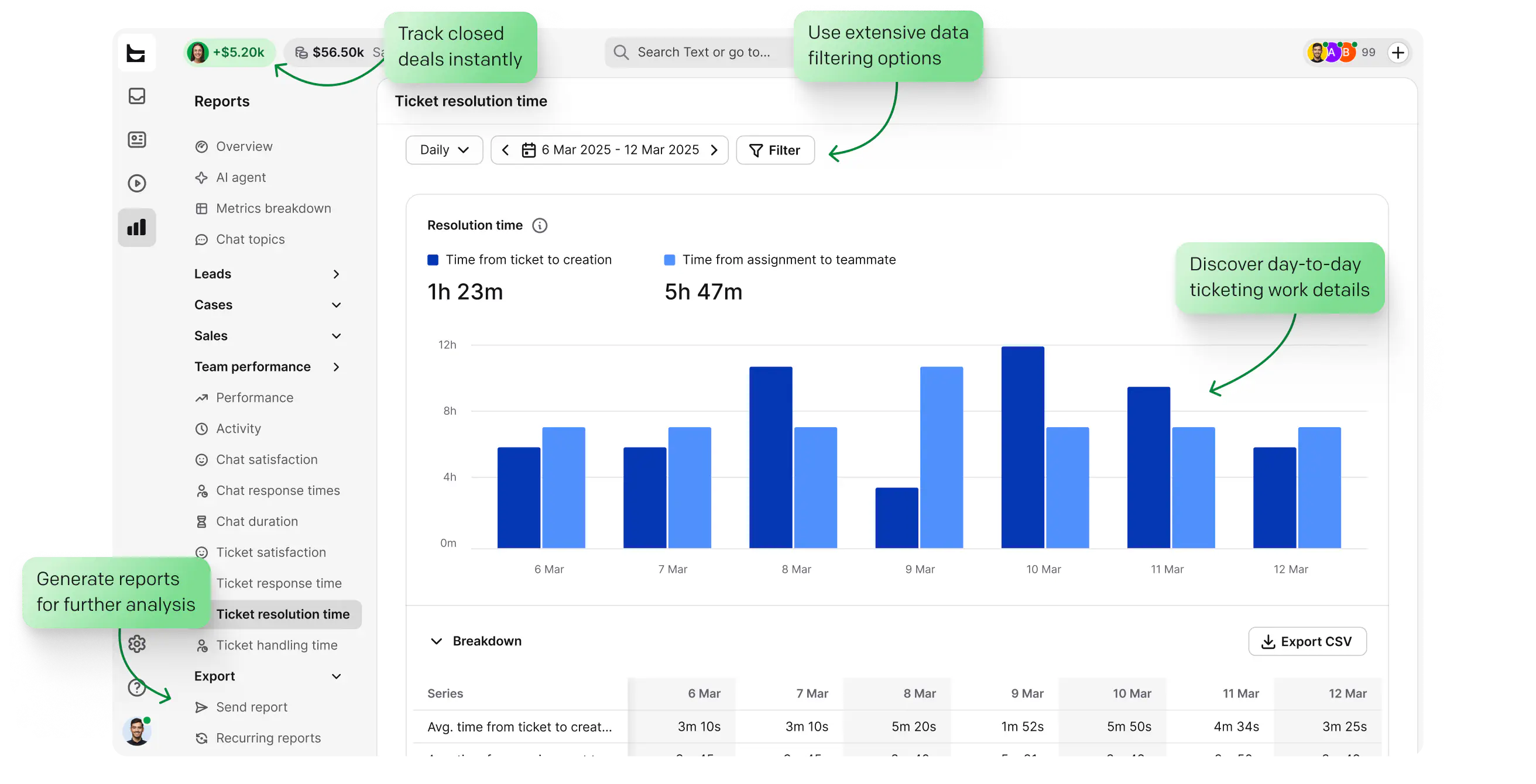
See response times, resolution times, and workload in clear reports that also track customer satisfaction.
Browse, filter, and save views to keep everyday work simple. Run bulk actions across many tickets at once. Switch between chats and tickets without leaving the workspace.


Set response and resolution targets, use SLA tracking per ticket, and escalate before you breach.

Connect AI assistants to your help desk through the Text MCP server, so they can read and act on tickets in your own tooling.


Each agent can spend more time resolving tickets and make our customers happier with an individual approach and better response time.
 Dalton Hasegawa,
Brastel saves 8 minutes handling each ticket. It's a 35% decrease in the ticket resolution time.
Brastel team handles nearly 2,000 tickets a month using automation.

Sign up and connect your support email address.

Bring in email, chat, Messenger, and SMS requests.

Receive, route, and resolve tickets from one inbox.
No credit card required
Explore the API documentation to connect your tools and build a support hub around your IT help desk.
Free 14-day trial No credit card required Advanced ticketing made easy
You'll be in
good company


The minute you create the automation rules, you can mark it ready to go live, and it immediately starts working for you.Nate Johnson
100+
tickets handled within four hours through prioritization and tagging.
7,000
actions performed by automation instead of agents.
Support employees across IT, HR, and operations from one queue, which makes managing internal requests across departments easier, with private notes and clear ownership.
Sign up freeHelp customers and partners over email, live chat, Messenger, and SMS. When an external conversation turns into a sales question, your team can pass it to revenue with full context, so good service does not leak pipeline.

Reach the Text Customer Success Team around the clock for setup help and guidance.
IT help desk software is help desk software and a ticketing system that gives your IT teams a single point for every support request. Instead of requests scattered across personal inboxes and chats, each issue becomes a ticket with an owner, a status, and a full history, so nothing slips through. HelpDesk brings email, live chat, Messenger, and SMS into one shared workspace, then layers built-in AI on top. The AI Agent handles routine questions, while reply suggestions, auto tagging, and automation rules clear the repetitive tasks. Your support team spends less time on busywork and more time helping customers resolve issues that genuinely need a person.
A help desk handles day-to-day requests and incidents: password resets, access issues, broken hardware, and how-to questions from the end user. A service desk is a broader IT service management function that can also cover assets, change management, and longer-term service delivery across the business. HelpDesk is help desk and ticketing software, built for the request-and-resolve work that desk technicians do every day. It covers ticket management, ticket routing, automation, and reporting for IT teams, without the heavier service management layers. If your work is mostly fielding and resolving support requests, a help desk is usually the right tool for the job. Coming from an enterprise ITSM suite? See how HelpDesk compares with ServiceNow.
HelpDesk has built-in AI features that work across the whole queue, so you do not need to bolt on extra tools. The AI Agent resolves routine questions in chat and goes beyond basic AI powered bots by handing off to a human with full context when a case gets complex. For agents, the AI tools include reply suggestions drawn from your knowledge sources, ticket summaries, text enhancements, language detection, and auto tagging. These AI capabilities take the repetitive tasks off your support team, from sorting incoming requests to drafting consistent replies. Everything runs inside the help desk, so the AI works on your tickets, your knowledge sources, and your customers directly.
Yes. You connect your other tools through Workflows, using predefined actions for supported software, or webhooks and the API for everything else. That lets the help desk trigger actions in your CRM, asset tools, and internal systems, and sync data both ways without heavy technical resources. You can automate handoffs to customer service software, push records into other business systems, and keep everything in step as tickets move. Because the connections run on Workflows and automation rules, your team sets them up once and they run on every matching ticket. It is flexible enough for complex customer operations, yet simple enough for small teams to manage tickets without a specialist.
Use tags, custom fields, priorities, and saved views to sort tickets by type, severity, or team, all from an intuitive, friendly interface that keeps everyday work simple. The AI suggests tags as tickets arrive, so auto tagging handles categorization with little manual effort, and bulk actions let you update many tickets at once. Canned responses speed up common replies, while collision detection and internal notes stop the team from stepping on each other during ticket management. You can split work across multiple departments and team sizes, with each ticket clearly owned and tracked. Good organization is what lets a support team scale ticket volume without losing the thread on any single request.
Yes. You can run internal IT support for employees and external support for customers and partners from the same shared workspace, whether you are a small business or a large team. Internal IT requests, such as access and device issues, sit alongside customer questions, each routed to the right people with private notes and clear ownership. Managing internal and external work in one place means your support team sees the full picture and never re-keys the same details twice. When an external conversation turns into a sales question, your team can pass it to revenue with full context, so good service does not leak pipeline. The same setup scales from small teams to complex customer operations, covering the full range of help desk services your team delivers.
A request arrives by email, live chat, Messenger, or SMS and becomes a ticket the moment it lands. Ticket routing rules send it to the right person or team by skill, language, or workload, so ticket assignment happens without manual triage. The agent then works the case with full context and AI reply suggestions, which speeds up ticket resolution and keeps answers consistent. Along the way, the help desk system can prioritize tickets, flag SLA risks, and apply automation features that handle the routine steps. Reports show ticket volume, response and resolution times, and team workload, so you can see how the whole helpdesk ticketing operation is performing.
Email, live chat, Messenger, and SMS, all in one inbox, which gives your IT teams true multichannel support without juggling separate tools. A request that starts on one channel stays a single conversation, so when it moves between channels no one has to re-explain the issue. The AI Agent can also offer self-service answers in chat, resolving routine questions instantly before they ever reach an agent. For customers and internal staff alike, that means faster first responses across every channel they already use. Pulling multiple channels into one queue keeps your support team focused on the conversations that actually need a human.
Yes. The AI Agent answers routine questions in chat and resolves up to 73% of them before they ever become a ticket. It pulls from your knowledge sources, like help articles and product docs, so the answers reflect how your business actually works. This built-in AI gives the end user fast self-service in chat, with no extra tools to install or maintain. When a request needs a person, the AI hands off to the right agent with full context, so nothing starts from scratch. The result is a support team that spends its time on judgment calls instead of routine password resets.
Yes, through Workflows. You set your response and resolution targets, then build a workflow that tracks tickets against them. As a ticket nears or passes its target, the workflow can message the assignee or team, reassign the ticket, or escalate it, so time-sensitive work does not sit unnoticed. The same Workflows engine handles ticket routing and prioritization, so urgent requests reach the right desk technicians first. You can scope these rules to specific teams, channels, or request types. For IT teams handling high ticket volume, it keeps response and resolution times on track without anyone watching the queue by hand.
Look for a shared ticket queue, automation, AI assistance, SLA tracking, reports, and integrations your team can manage without a long rollout. The right IT help desk software should support your current channels and ticket volume while giving you room to add teams, workflows, and reporting as demand grows.
Setup takes about five minutes: sign up, connect your support address, and start receiving tickets right away. The trial is free for 14 days and needs no credit card, so your IT teams can test real workflows before committing. During the trial you can connect channels, build automation rules, and invite your support team to work live tickets together. From there, paid plans scale with the number of agents and the AI usage you need, so spend grows only as the team grows. Whether you run a small business or support at scale, you start on the free trial and move to a paid plan once the fit is clear.
Free 14-day trial 5-minute setup No credit card required
You'll be in
good company